

Contact and calendar sync rarely gets attention until it starts causing problems. That’s why comparisons like CiraSync vs. third-party sync tools matter to IT teams.
On paper, many tools promise the same outcome. In practice, the differences show up in control, security reviews, user behavior, and long-term maintenance.
This article looks at how CiraSync compares to typical third-party sync tools and how each approach behaves as organizations grow.
How CiraSync Works at a High Level
CiraSync uses Microsoft 365 (Entra ID/Azure AD + Exchange) as the source of truth, then pushes contacts and calendars straight into the device’s native apps on iOS and Android. Users do not install a mobile app.
IT sets it up once in the admin portal, grants OAuth consent, and defines sync rules like who gets which contacts, what gets excluded, and the sync schedule.
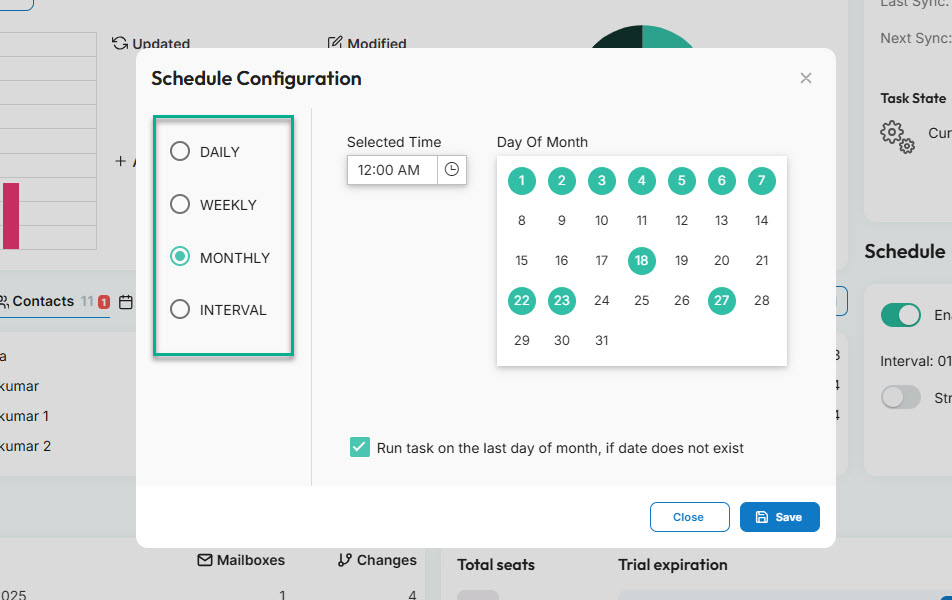
After that, syncing stays automatic, which cuts tickets and keeps data aligned as you add users, roles, and locations.
How Typical Third-Party Sync Tools Work
Most third-party sync tools take a very different approach. They usually rely on connectors or user-level setups, meaning each user has to authenticate, approve permissions, or install something on their device.
Sometimes it’s a mobile app. Sometimes it’s an add-in. Either way, IT doesn’t fully own the flow.
Permissions live at the user level, not centrally, which already creates gaps. Configuration often happens more than once, especially when phones change, users upgrade OS versions, or accounts get re-authenticated.
Over time, things drift. Contacts stop updating. Calendars sync for some users but not others. Offboarding becomes messy.
What starts as “quick to deploy” turns into manual checks, support tickets, and work just to keep data mostly aligned.
CiraSync vs Third-Party Sync Tools
1. Control and Administration
With most third-party sync tools, users manage sync, even if IT helped with the initial rollout, and permissions sit with individuals.
When someone changes roles, switches departments, or leaves, IT has to chase cleanup. Sometimes the sync keeps running, or it breaks. Either way, control erodes over time, and administration turns reactive instead of predictable.
With CiraSync, however, control lives where IT expects it to live, in the admin layer. You define the rules centrally. Which GAL contacts sync, which shared mailboxes matter, which users or groups receive what, and how often updates run.
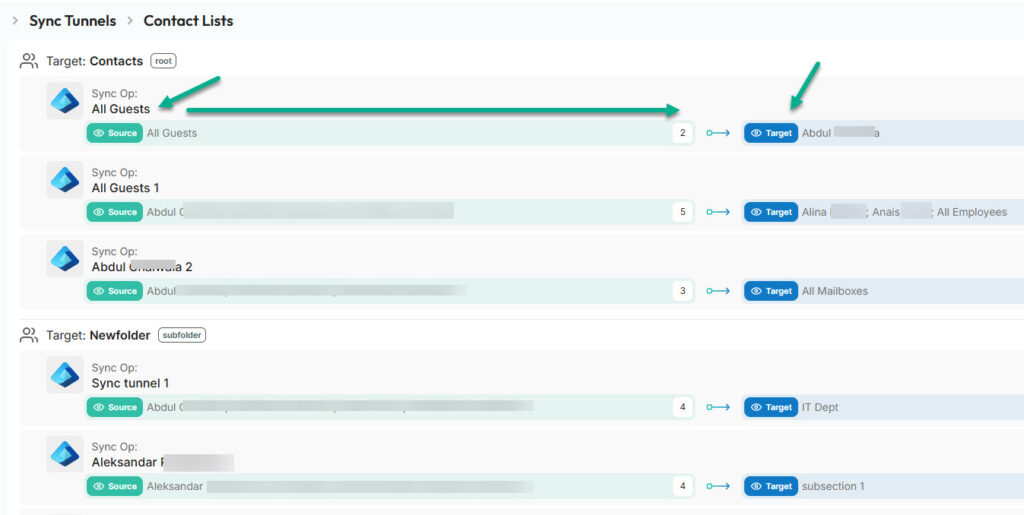
You can see the configuration. You can audit it. Nothing depends on a user remembering to log in, re-authorize, or keep an app running.
2. Security and Compliance Considerations
This is where a lot of sync tools fail IT reviews.
Tools can “work” and still be unacceptable from a security standpoint. IT and compliance teams care about access scope first. Who has permission to what, and how broad that access really is.
Many third-party tools request user-level permissions that are hard to standardize and harder to revoke cleanly. That creates many blind spots.
CiraSync takes security and compliance extremely seriously. It’s at the core of everything we do internally and for our customers.
For IT teams, security starts with understanding exactly where data goes and who has access to it. CiraSync integrates directly with Microsoft Azure and uses the Azure Consent Framework. Authentication happens through Microsoft’s own login flow.
Our security and compliance guide goes into more detail, but let’s summarize the most essential points here.
All subscriber data stays within the Microsoft Cloud, and mailbox updates occur over secure HTTPS connections using Exchange Web Services, without routing through the public internet.
CiraSync operates as a data processor and follows GDPR requirements, including the right to be forgotten, data portability, informed consent, and regional data residency.
Cached sync data can be purged automatically, and personal data remains encrypted.
For IT, this matters because a tool that syncs data but cannot clearly explain access, storage, and auditability rarely passes security or compliance reviews.
View our security whitepaper for more details.
3. Reliability and Ongoing Maintenance
Most third-party sync tools start fine, then drift. Sync depends on user logins, device settings, background app behavior, and periodic re-authentication.
Over time, permissions expire, OS updates change how apps run, and some users fall out of sync without anyone noticing.
IT usually owns the ticket, but the fix often lives on the user’s phone, which means repeating the same steps across multiple devices.
With CiraSync, sync runs on an admin-defined schedule from Microsoft 365 as the source of truth. Changes get handled centrally, and users can switch devices or roles without breaking the sync model.
4. Scalability and Long-Term Fit
What feels manageable at 10 users usually breaks at 500. Many third-party tools rely on per-user setup, individual permissions, or manual fixes, which scale linearly with headcount.
As the organization grows, IT workload grows with it. More devices, more exceptions, more cleanup.
With CiraSync, the model stays the same at 50 or 10,000 users. Rules are defined once and applied across groups.
That reduces ongoing admin work and avoids the rework that happens when a “temporary” sync solution becomes permanent infrastructure.
CiraSync vs Other Third-Party Sync Tools: Which is Better
When sync becomes part of daily operations, the difference between tools is no longer theoretical. User-managed solutions might feel convenient early on, but they break down as headcount, devices, and compliance expectations grow.
That’s where CiraSync stands apart. It treats contact and calendar sync as core infrastructure, with centralized control, predictable behavior, and security aligned with Microsoft 365 itself.
For organizations that want fewer tickets, cleaner offboarding, and a sync model that still works at scale, CiraSync isn’t just an alternative. It’s the safer long-term choice.
Frequently Asked Questions
CiraSync removes user-managed syncing. IT controls everything centrally, and contacts and calendars stay aligned across devices without relying on apps, add-ins, or user action.
Do users need to install a mobile app to use CiraSync?
No. Contacts and calendars sync directly into the native iOS and Android apps through Microsoft 365. Nothing is installed on user devices.
How does CiraSync handle permissions and access?
Permissions are granted through centralized admin OAuth consent in Microsoft Azure. Access is controlled at the tenant level, not per user.
Does CiraSync store passwords or user credentials?
No. Authentication happens through Microsoft’s login flow, and passwords are never stored by CiraSync.
Where is contact and calendar data stored?
All data remains within the Microsoft Cloud. CiraSync processes and syncs data but does not move it into third-party mobile apps.
How does CiraSync support security and compliance requirements?
CiraSync aligns with GDPR requirements, supports data residency, encrypts personal data, and allows cached sync data to be purged automatically.
Can CiraSync scale to large organizations?
Yes. The same admin-defined rules apply whether you have dozens of users or thousands, without increasing per-user maintenance.