
Our Clients Want Consistency. DIY Sync Won’t Get You There.
Scripts and CSVs don’t scale across tenants. Clients expect their MSP to deliver a reliable, Microsoft‑aligned fix.

Why DIY Fails
- Inconsistent Outcomes: Each client, each department, a new workaround.
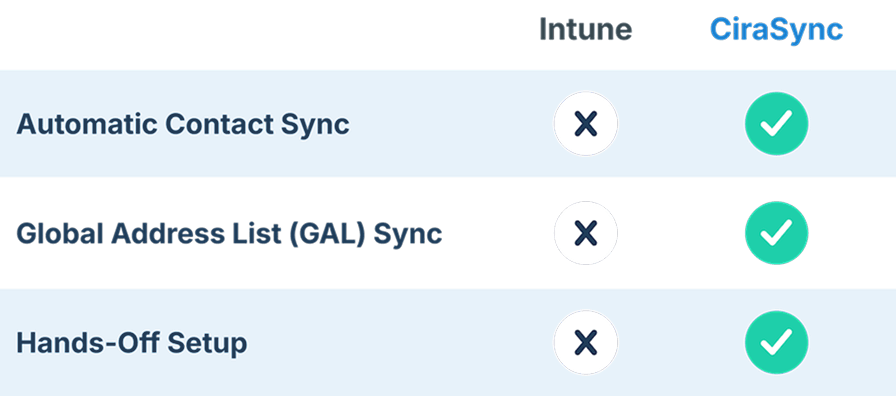
- MDM ≠ Sync: Intune locks down devices — it doesn’t sync contacts/calendars to them.
- Hidden Labor: Every change in Microsoft 365 becomes manual rework.
The Modern MSP Approach

Centralize Rules Once, Apply Across Tenants.

Map Microsoft 365 Groups/Lists to the Right Users and Devices.

Prove Control With an Audit‑Friendly Trail (No Spreadsheets).
“We migrated a client from Google Workspace to M365 but needed a powerfull replacement for contacts management. With thousands and thousands shared contacts, it was a crucial element for our client. We chose CiraSync and few month later, neither us or our client regret the decision. Everything is easy to setup and really efficient to use.“
TD
Why Expand CiraSync Across Your List of Clients?
Most of your Microsoft clients face the same issue that we see time and time again

Missing or Outdated Contacts/Calendars
365 clients have names, numbers, dates or events that are missing outdates on their employee phones.

365 Clients Have to Spend Time Manually Updating Each Phone
IT has to spend hours per week wasted on manually updating each phone with contact information or events and meetings.

Vital Contacts or Calendar Updates are Missed
Without an easy automated system emergency contacts are missed or meetings are not attended due to human error or overlook.
See CiraSync In Action with a Customer
Check out how CiraSync works with a new onboard hire who needs to contact a vendor that they’ve never spoken to.


The new hire, Chris, has Kristen’s name, number, and photo automatically added to his phone when he is onboarded.
This allows for quick identification of individuals from within the company and reduces contact friction.

Kristen makes a request for Chris to reach out to the logistics company they work with in order to verify delivery.
Chris doesn’t have to look anywhere except his phone’s contact list to see the logistics company contact information.
No second guessing who to reach out to.

Chris is able to easily identify the contact to reach out to and begins establishing communication to quickly move on with the job they have been hired to do.
This reduces delays and improves both confidence and trust with their clients.
Here’s How You Can Start Expanding CiraSync to Your Clients
CiraSync Automatically Syncs the Public Folders to Smartphones
CiraSync Automatically Syncs Calendars to Smartphones
CiraSync Automatically Syncs CRMs to Smartphones
CiraSync Automatically Syncs the Public Folders to Smartphones
CiraSync Automatically Syncs Calendars to Smartphones
CiraSync Automatically Syncs CRMs to Smartphones

Send Your Revenue Results to Your Team
Take the results from our ROI calculator and share them with your team to show the value that CiraSync provides to your bottom line

Schedule a Call with Your Partner Advisor
Once you’ve determined how valuable CiraSync is to you and your team, schedule a call with your CiraSync partner advisor key team members

Prospect Your Clients Who Need CiraSync
Start building a list of your highest value clients who need CiraSync built into their workflow and start purchasing CiraSync licenses

