
How to Sync Microsoft 365 Shared Calendars with CiraSync
Shared calendars only work when everyone sees the same updates. But Microsoft 365 does not always push those changes to mobile devices. That creates confusion and missed events. CiraSync fixes this by syncing shared calendars directly to every phone. You choose a...
What is CiraSync? Complete Tutorial for New Users
If your team uses Microsoft 365, you’ve probably dealt with the little annoyances that pile up over time. Outdated contacts on phones. Missed appointments because a shared calendar didn’t update. Caller ID showing random numbers you don’t recognize. CiraSync solves...
The 8 Best Field Service Management Software Solutions We Recommend in 2026
Field service teams face growing pressure to work faster, smarter, and more efficiently as customer expectations climb. Customer expectations keep climbing. Salesforce reports that 82% of service professionals agree customer expectations are higher than they used to...
The 8 Best MSP Software Solutions We Recommend to IT Teams
MSP leaders say their engineers spend around 39% of the week on repetitive, manual tasks, and 88% admit those tasks regularly get in the way of more strategic work. On top of that, the same LogicMonitor research found MSPs juggle about 10 different tools just to...
CiraHub Product Updates – November 2025
We’ve added four powerful features this month to give you more control over how data flows across your spokes. This will help you keep everything cleaner, more organized, and easier to manage. Let’s take a look. — Check out what we released in October 2025. 1. Export...
8 Best Construction Project Management Software in 2026
Managing a construction project is chaos, unless you’ve got the right tools. Between job site delays, subcontractors changing numbers, outdated plans, and too many apps that don’t talk to each other, things can fall apart fast. And it’s not just frustrating; it costs...
CiraHub Product Updates – October 2025
We’ve added four powerful features this month to give you more control over how data flows across your spokes. This will help you keep everything cleaner, more organized, and easier to manage. Let’s take a look. — Check out what we released in September 2025. 1....
CiraHub Product Updates – September 2025
We’ve added two powerful features this month to give you more control over how data flows across your spokes. This will help you keep everything cleaner, more organized, and easier to manage. Let’s take a look. 1. Filter Sync Data by Originating Spoke You can now...
Outlook-Kontakte exportieren: So geht’s in jeder Outlook-Version (2026)
Introduction Eine Kopie Ihrer Outlook-Kontakte, also Ihres persönlichen Adressbuchs, brauchen Sie, wenn Sie das Gerät oder den E-Mail-Dienst wechseln, eine Sicherung anlegen oder Adressen in Excel bearbeiten möchten. Welche Schritte nötig sind, hängt von Ihrer...
CiraSync Product Updates – What’s New!
We’re excited to share the latest updates across both CiraSync and CiraHub—designed to give IT admins greater flexibility, tighter control, and more options when it comes to syncing contacts and calendars across platforms. Whether you’re managing guest users,...
CiraSync Contact Sync Best Practices & Management Guide
Whether you’re syncing contacts to smartphones, Global Address Lists, or CRMs, following these best practices will help you maximize the value of CiraSync—ensuring reliable synchronization and a smoother experience with CiraSync. Best Practices Before You Sync...
CiraSync Product Update – What’s New This Quarter
We’re excited to introduce a new round of updates across all CiraSync products—designed to enhance usability, simplify administrative workflows, and give you greater visibility and control throughout the sync process. 1. Health Status in Notifications panel Admins can...
How to Hide Users from the Global Address List in Microsoft 365 and Exchange
Quick answer: For a cloud-managed mailbox, hide the recipient in the Microsoft 365 admin center, Exchange admin center or Exchange Online PowerShell by setting HiddenFromAddressListsEnabled to True. For a directory-synchronized mailbox, first confirm where its...
Global Address List Not Updating? (5 Proven Solutions) — CiraSync
There’s no reason to panic if your Global Address List is not updating. This is because there are many tried and tested solutions to this problem that anyone with a keyboard and a mouse can use. Let’s take a look! Solution 1: Force an Offline Address Book (OAB) Update...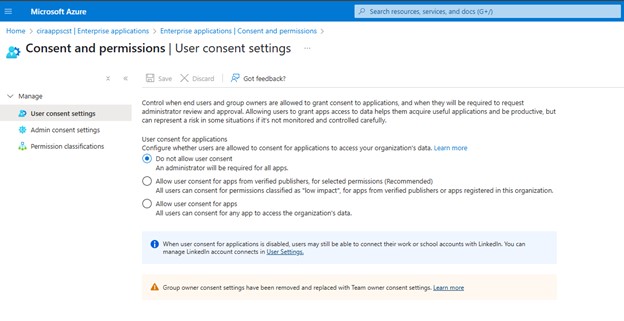
Signing Up for CiraHub Without a Global Admin Role? Here’s What to Know
⭐ If a user sees an „Approval required“ message during the CiraHub sign-up process, it usually means their organization has restricted users from granting consent to third-party applications. This is a common security setting in Microsoft Azure...
CSOP Certificate-Based Authentication Setup
In this guide, we will walk you through the process of setting up Certificate-Based Authentication in CSOP, including certificate creation, configuration, and best practices for ensuring synchronization. For an overview of Certificate-Based Authentication, refer to...
CiraSync App Consent and Certificate-Based Authorization Guide
CiraSync requires authentication to access Azure Active Directory (Azure AD) and Exchange Online for syncing contacts and calendars. This authentication can be configured using Application Consent or Certificate-Based Authorization, depending on the environment....
CiraSync Service Account Requirements for On-Premises Environments
This guide provides a detailed breakdown of the CiraSync Service Account Requirements for On-Premises Environments: On-Premises Environment Use Case: For reading an on-prem AD and syncing directly to Exchange on-prem mailboxes we will need following In this scenario...
CiraSync Service Account Requirements for Cloud Environments
This guide provides a detailed breakdown of the CiraSync Service Account Requirements for cloud environments: Cloud-Only Environment Use Case: For organizations running Azure AD and and syncing directly to Office 365 mailboxes in Exchange Online. In this scenario no...
CiraSync Service Account Requirements for Hybrid Environments
This guide provides a detailed breakdown of the CiraSync Service Account Requirements for Hybrid Environments: Hybrid Environment Hybrid environments involve synchronizing an on-prem AD with both Exchange on-prem and Office 365 mailboxes in Exchange Online. Use Case...
How to Two-Way Sync Between Clio and DealCloud
Thanks to CiraHub, you can now create an automatic two-way sync between Clio and DealCloud, bridging the gap between your legal matter management and deal tracking systems. By following the steps in this article, you can ensure that key contacts stay perfectly...
How to Two-Way Sync Between Clio and HubSpot
Is your law firm struggling to keep clients‘ contact information consistent between Clio and HubSpot? That disconnect between your practice’s management and marketing tools might be costing your firm valuable time and creating unnecessary confusion....
How to Two-Way Sync Between Clio and Google Workspace
Have you been searching for a way to keep your Google Workspace Clio contacts in sync? CiraHub does just that, eliminating the constant toggling between platforms to update client information that can eat away at your productive hours. This guide walks you through how...
How to Two-Way Sync Between Clio and Active Campaign
If you’re balancing client management in Clio with email campaigns in Active Campaign, you know how frustrating it is when contact data doesn’t match up between systems. CiraHub offers a better way to handle this. This guide shows you how to create a...
How to Two-Way Sync Between Clio and MS365 User Mailbox
Juggling contact information between different systems can be a real headache for law firms. If you’re using Clio for your practice and Microsoft 365 for email and calendars, you probably know the frustration of having to manually update contact info in multiple...
How to Two-Way Sync Between Clio and MS365 Public Folder
Microsoft 365 Public Folders offer excellent shared contact management, but keeping them in sync with your Clio system can quickly become a manual burden. This guide solves that common workflow challenge by showing you how to establish an automatic two-way sync...
How to Two-Way Sync Between Clio and QuickBooks
If your law firm’s data in Clio doesn’t match your records in QuickBooks, billing clients and making reconciliations could suffer. CiraHub is a game-changer for law firms facing this problem. This guide shows you how to create a two-way sync between Clio...
How to Two-Way Sync Contacts Between Clio and Salesforce
Syncing contacts between Clio and Salesforce helps keep client and case information consistent across both platforms. Legal professionals rely on Clio for case management and Salesforce for client interactions, so having up-to-date contact details in both systems...
How to Two-way Sync Contacts Between Clio and Global Address Lists
Legal professionals need a centralized directory of firm-wide contacts to improve communication. Without a direct sync, Clio contacts may not appear in the organization’s Global Address List (GAL), leading to organization having access to incomplete contact lists,...
How to Two-Way Sync Contacts Between Clio and Zoho
Legal professionals rely on Clio for case management and Zoho for CRM and business operations. Keeping contact details aligned between these platforms can be quite difficult without a synchronization platform, especially when client information frequently changes....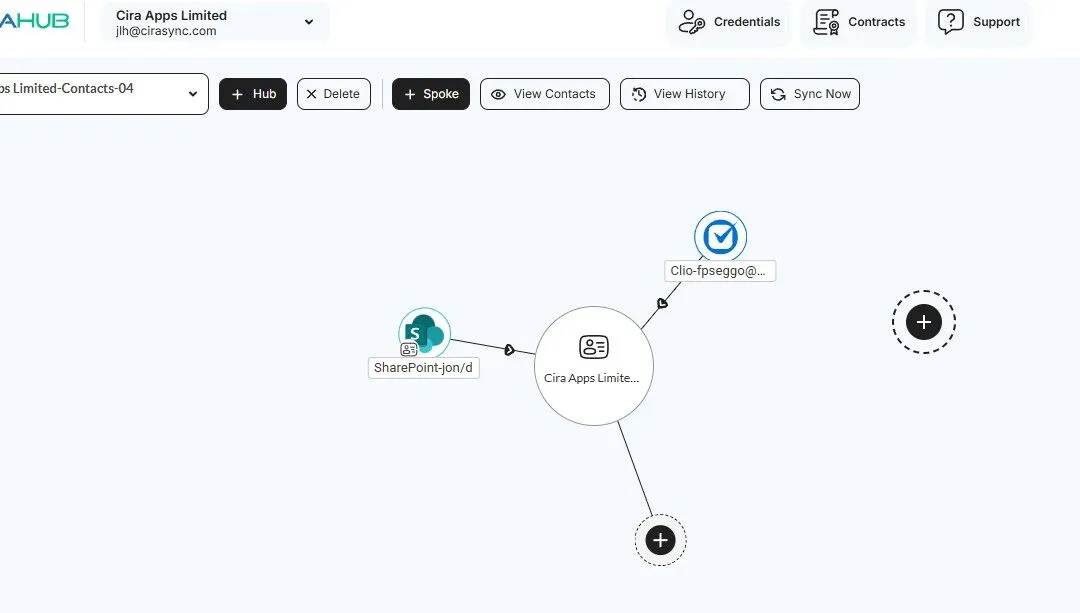
How to Two-Way Sync Contacts Between Clio and SharePoint
Law firms using Clio for case management and SharePoint for document collaboration often face challenges in keeping contact lists current. Without a direct sync, attorneys and staff may struggle to access up-to-date client and case-related contacts. Connecting these...
How to Two-Way Sync Contacts Between Clio and iCloud
Attorneys and legal teams often rely on iPhones, iPads, and Macs to manage client interactions. Keeping Clio contacts updated across Apple devices can be a hassle without an automatic sync. A two-way connection keeps information consistent, so lawyers can access the...
How to Set Up a Clio Contact Spoke with CiraHub
Clio is a popular legal practice management platform that helps law firms and organizations manage their contact information, legal cases, and important documents. If you need to synchronize your Clio contacts with other platforms, CiraHub makes it easy by enabling...
CiraSync Product Update: What’s New and Improved
CiraSync is continuously evolving to provide users with customizable synchronization tools and an improved user experience. Our latest update introduces several key features that simplify calendar and contact management while improving the user interface and...
CiraHub Product Update: Key Improvements & Fixes
We’ve made some updates to CiraHub to improve syncing, fix minor issues, and make things easier to use. This update includes better performance, new features, and small fixes to keep everything running smoothly. Read on to see what’s new! 1. UI and Dashboard...
Licensing User Mailboxes Using Contact Collections
A Contact Collection is a group created from user mailboxes. This is a useful CiraSync On Premise construct that allows IT admins to perform a singular action on multiple mailboxes at once. Contact Collections can be used to define sources and targets for sync tasks,...
Scheduling CiraSync On Premise Sync Tasks
Automating synchronization tasks in CiraSync On Premise ensures that contact data remains up to date without requiring manual intervention. By scheduling sync tasks, you can define when and how often CiraSync On-Prem refreshes and updates contact information across...
Creating a Calendar Distribution List
A Calendar Distribution List (CDL) in CiraSync On Premise allows you to synchronize and distribute calendar events from a designated data source to specified recipients. Follow the steps below to create and configure a Calendar Distribution List in CiraSync On...

