

En el ámbito sanitario, la comunicación se interrumpe más rápido de lo que la mayoría de los equipos esperan. Un contacto perdido, un rol obsoleto o un número incorrecto pueden ralentizar la atención y generar riesgos.
La Lista Global de Direcciones ocupa un lugar central en este sentido. Cuando no se sincroniza correctamente, los pequeños problemas se convierten en dificultades operativas diarias.
En esta guía, mostraremos cómo funciona la sincronización de la Lista Global de Direcciones para el sector sanitario.
Qué significa la Lista Global de Direcciones en un entorno sanitario
En el sector sanitario, la Lista Global de Direcciones es básicamente el cerebro compartido de los contactos de la organización. Es el lugar al que acude el personal para encontrar direcciones de correo electrónico, números de teléfono y funciones sin tener que preguntar a nadie.
Para los médicos, la rapidez es importante. Un médico necesita ponerse en contacto rápidamente con un especialista, una enfermera de guardia o un coordinador de cuidados, a menudo desde un dispositivo móvil, a veces en medio de un turno.
Los equipos administrativos utilizan la Lista Global de Direcciones de forma diferente. La utilizan para la programación, las referencias y la coordinación entre departamentos. Por otro lado, los equipos de soporte y IT la consideran un sistema que debe mantener su precisión a medida que se incorporan personas, cambian de funciones o abandonan la empresa.
Retos comunes de la sincronización de la Lista Global de Direcciones en las organizaciones sanitarias
1. Datos de contacto inconsistentes entre dispositivos
En el sector sanitario, es raro que la gente trabaje desde un solo dispositivo. Un médico puede consultar Outlook en una estación de trabajo, luego cambiar a su teléfono personal durante las rondas y, a continuación, utilizar una tableta compartida.
Ahí es donde las cosas empiezan a romperse.
Los contactos existen en Outlook, pero nunca aparecen en el móvil. O alguien ha guardado un número manualmente en su teléfono y nadie más puede verlo.
El resultado son diferentes versiones de la verdad, dependiendo del dispositivo.
2. Retrasos en la actualización de los cambios de personal
Los equipos de salud cambian constantemente.
- Llegan nuevos empleados.
- Los roles cambian.
- Los contratistas rotan.
Cuando esas actualizaciones no llegan rápidamente a la Lista Global de Direcciones, los antiguos empleados permanecen en las listas de contactos, mientras que faltan los nuevos empleados. Eso no solo es molesto, sino también arriesgado.
Los mensajes llegan a las personas equivocadas. La información confidencial llega a donde no debería.
En el ámbito sanitario, retrasos como este no son insignificantes. Crean silenciosamente brechas en la comunicación y la responsabilidad.
Hablemos de la siguiente razón por la que la sincronización de la Lista Global de Direcciones es importante para la asistencia sanitaria.
3. Múltiples departamentos y estructuras complejas
Los hospitales y los sistemas sanitarios no son organizaciones planas.
Tiene departamentos, especialidades, turnos de guardia y equipos ubicados en diferentes lugares. Cuando todo se mezcla en una sola lista de direcciones, a la gente le cuesta encontrar rápidamente el contacto adecuado.
Con el tiempo, la Lista Global de Direcciones deja de ser útil y empieza a resultar molesta. Cuanto más grande es la organización, más evidente se hace este problema.
4. Preocupaciones en materia de seguridad y cumplimiento normativo
Otro problema relacionado con la sincronización de la Lista Global de Direcciones en el ámbito sanitario es la seguridad.
Las organizaciones sanitarias son cautelosas, con razón, en lo que respecta al acceso y los permisos. Quién ve qué es importante.
La sincronización manual suele parecer más segura al principio, pero normalmente conlleva más riesgos. Los contactos se comparten sin que nadie lo controle. Los datos antiguos permanecen activos más tiempo del que deberían. El departamento de IT pierde visibilidad. Los equipos de cumplimiento normativo se preocupan, y no les falta razón.
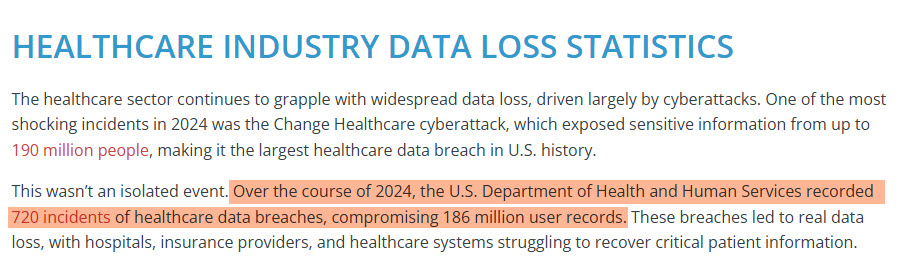
En 2024, el Departamento de Salud y Servicios Humanos de los Estados Unidos registró 720 incidentes de violaciones de datos de servicios de salud. Esto comprometió aproximadamente 186 millones de registros.
Además, el coste medio de una violación de datos de atención sanitaria alcanzó los 7,42 millones de dólares por incidente, lo que convierte al sector sanitario en el más caro de Estados Unidos en caso de violación de datos.

Sin reglas claras y automatización, mantener la seguridad de la Lista Global de Direcciones se convierte en una tarea de limpieza constante en lugar de un proceso controlado.
Por qué la sincronización manual de la Lista Global Direcciones falla en el sector sanitario
La sincronización manual de la Lista Global de Direcciones suele comenzar con buenas intenciones, pero poco a poco se va desmoronando. Estos son los sistemas que suelen fallar:
- Alguien exporta los contactos y los importa manualmente.
- Se pide al personal que gestione sus propios teléfonos y tabletas, lo cual funciona hasta que deja de hacerlo.
- Los equipos de IT prueban scripts o soluciones parciales para subsanar las deficiencias. Al principio, parece manejable. Con el tiempo, se convierte en un caos.
Faltan actualizaciones. Los errores se acumulan. Las pequeñas solicitudes se convierten en tickets constantes. Ninguno de estos enfoques se adapta al entorno sanitario y, silenciosamente, alejan al departamento de IT de tareas de mayor prioridad.
Cómo la sincronización automatizada de la Lista Global de Direcciones resuelve estos problemas
La sincronización automática cambia toda la dinámica. En lugar de tener que buscar las actualizaciones, el sistema mantiene los contactos alineados por ti.
Ahí es donde una herramienta como CiraSync encaja perfectamente.
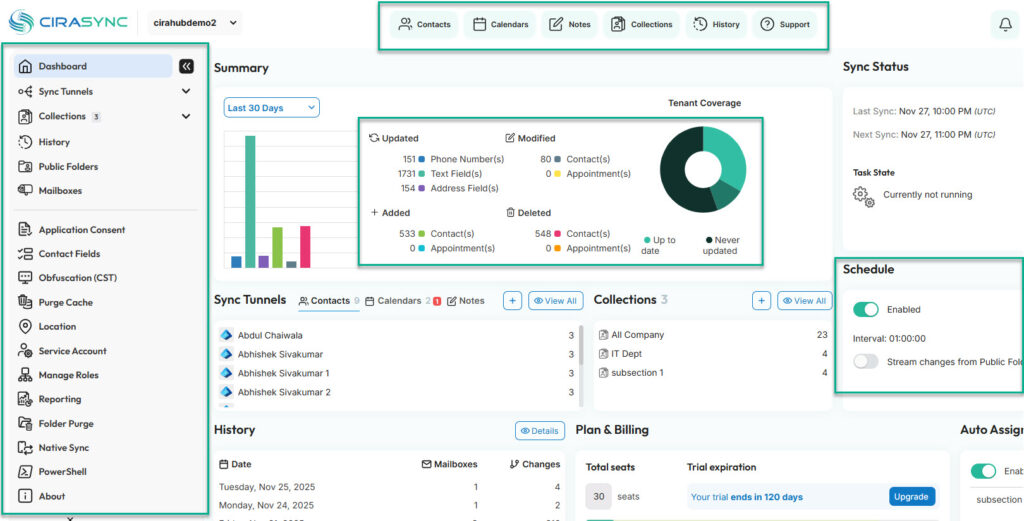
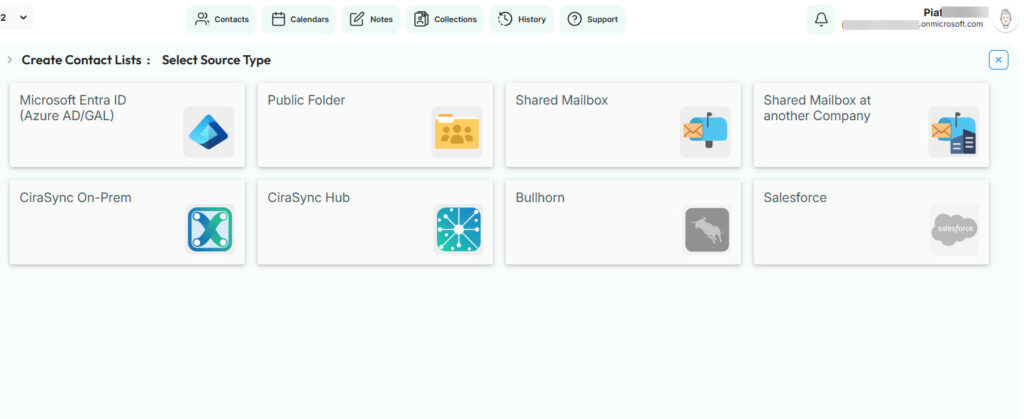
Sincroniza automáticamente los contactos de la Lista Global de Direcciones de Microsoft 365 con los dispositivos de los usuarios, sin necesidad de que el personal tenga que hacer nada manualmente.
- Los nuevos empleados aparecen cuando deben aparecer.
- Los usuarios que han abandonado la plataforma desaparecen a tiempo.
- El departamento de IT establece las reglas una vez y mantiene el control.
En el ámbito sanitario, ese tipo de coherencia reduce el riesgo, disminuye las solicitudes de asistencia y mantiene la comunicación fluida sin necesidad de realizar limpiezas constantes.
Preguntas frecuentes
La Lista Global de Direcciones es un directorio compartido en Microsoft 365 que almacena los datos de contacto del personal, como nombres, correos electrónicos, funciones y números de teléfono. Los equipos sanitarios lo utilizan a diario para comunicarse rápidamente entre departamentos.
¿Por qué es importante la sincronización la Lista Global de Direcciones en el sector sanitario?
La sincronización de la Lista Global de Direcciones (LGD) es importante en el sector sanitario porque los retrasos o errores afectan a los flujos de trabajo reales. Los médicos, el personal administrativo y los equipos de apoyo dependen de una información de contacto precisa para coordinar la atención, la programación y las operaciones.
¿Por qué no aparecen los contactos en los dispositivos móviles del personal hospitalario?
Por defecto, los contactos de la LGD suelen permanecer solo en Outlook. Sin sincronización, no aparecen automáticamente en teléfonos o tabletas, lo que crea lagunas.
¿Es segura la sincronización manual de en el ámbito sanitario?
Al principio parece seguro, pero a largo plazo es arriesgado. Las actualizaciones manuales son fáciles de pasar por alto y difíciles de controlar, especialmente con los cambios de personal.
¿Cómo afecta la sincronización de la Lista Global de Direcciones en el sector sanitario a la seguridad y el cumplimiento normativo?
Los contactos antiguos y el acceso no gestionado aumentan el riesgo. Una sincronización adecuada ayuda a eliminar a los antiguos empleados y a limitar quién ve qué.
¿Cuál es la mejor herramienta para sincronizar una Lista Global de Direcciones (LGD) sanitaria con dispositivos móviles?
CiraSync es la mejor herramienta para sincronizar una Lista Global de Direcciones (LGD) para el sector sanitario con dispositivos móviles. Sincroniza los contactos de la LGD de Microsoft 365 directamente con los dispositivos de los usuarios según las reglas que controla el departamento de IT, lo que garantiza la coherencia de todos los datos.