
CiraSync InterAction Integration
Keep every client relationship visible across the firm. When a contact updates in InterAction, it reflects across Microsoft 365 and on attorney devices — maintaining firm-wide relationship intelligence with CiraSync.
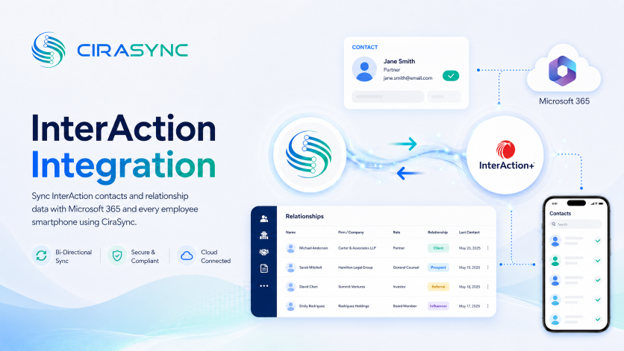
Two-Way: CiraSync Hub
One-Way: CiraSync Cloud, CiraSync On-Prem
What This Integration Does
- Two-way sync of InterAction contacts with Microsoft 365 GAL, User Mailbox, Google, iCloud, or another CRM via CiraHub
- Automatic mobile distribution through CiraSync, so attorneys always have current client contacts on their smartphones
- Field-level mapping with support for InterAction categories and tags
- Selective sync filters to control which contacts reach which users
How It Works
- Connect: Authenticate InterAction and Microsoft 365 (or another endpoint) in CiraHub.
- Map: Select fields, categories, tags, and sync direction.
- Sync to Phones: CiraSync automatically updates device contact lists.
Note
InterAction syncs via CiraHub. CiraSync handles mobile delivery. Both products work together as part of a single workflow.
Who Benefits
Law Firms
Law firms rely on current client data to protect relationships. CiraSync ensures every attorney has accurate contact information on their phone and in Outlook without manual updates or IT intervention.
Professional Services Teams
Teams that track client relationships across practices and offices use InterAction to maintain that intelligence centrally. CiraSync extends that investment to every Microsoft 365 user and mobile device.
Client Relationship Managers
When a contact changes in InterAction, CiraSync propagates that update firm-wide automatically. Relationship managers stay current without chasing down sync issues.
Outcomes
- Updated client contacts across all departments
- Improved client communication and follow-up
- Eliminates manual contact management overhead
- Reduced risk of attorneys reaching out with outdated contact details
Requirements
- CiraHub subscription
- InterAction subscription
- Microsoft 365 admin credentials
Trusted by Legal Professionals Everywhere
It works perfectly. Easy to set up. Very helpful to get us all set up. We have had to call twice for tweaks, and they answered on the spot. Issue fixed immediately.»
Mitchell Law Practice
«The go-to solution for syncing important info within my organization»
James Legal Service Professional)
«The first step towards great lawyer and client communication is the establishment of clear and effective communications channels»
American Bar Association Reference

