

CiraSync Procore Integration
Keep every vendor and subcontractor tied to the right project. When contact information updates in Procore, it reflects across Microsoft 365 and on field teams’ devices automatically, maintaining project-centric accuracy without manual intervention. CiraSync eliminates the spreadsheets, export workflows, and delays that disconnect subcontractors, vendors, and emergency contacts on the jobsite from the people who need to reach them.
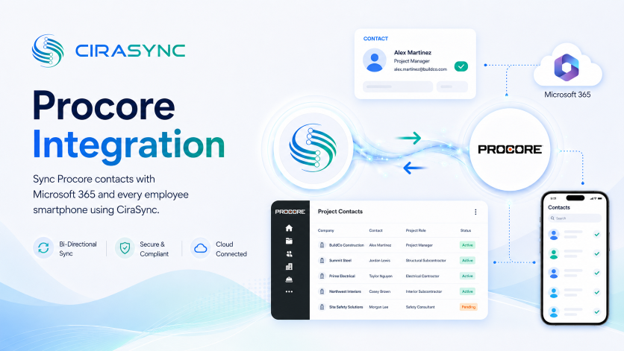
Two-Way: CiraSync Hub
One-Way: CiraSync Cloud, CiraSync On-Prem
What This Integration Does
- Two-way sync of Procore contacts (companies, vendors, subcontractors, project stakeholders) with the Microsoft 365 Global Address List (GAL), User Mailbox, Google, iCloud, or another CRM via CiraHub
- Automatic distribution of updated Procore contacts to Outlook and iOS/Android smartphones via CiraSync
How It Works
- Connect: Sign into Procore and Microsoft 365 within CiraHub to enable two-way syncing of contacts tied to projects, vendors, and construction field operations.
- Map: Select fields and sync direction (Procore to GAL or another endpoint), and apply filters such as project-specific groups or subcontractor categories.
- Sync to Phones: CiraSync automatically pushes the latest Procore contacts into each user’s native Contacts app. No mobile app required.
Note
Procore connects through CiraHub for bidirectional sync. CiraSync handles secure, automated delivery to smartphones.
Who Benefits
Field Teams and Superintendents
Instant access to subcontractors, vendors, and emergency contacts on the jobsite, delivered directly to the native phone contacts app.
Project Managers
Always-accurate project stakeholder directories across every device, updated automatically when Procore records change.
IT Departments
Centralized sync management, full visibility into what is syncing where, and no user-side configuration to support.
Outcomes
- Reduce miscommunication and project delays caused by outdated subcontractor or vendor contact information
- Save hours each week by eliminating manual exports, spreadsheets, and contact cleanup tasks
- Improve jobsite safety and response times with current phone numbers available instantly on mobile
Requirements
- CiraHub subscription
- Procore subscription
- Microsoft 365 admin consent

