

On paper, contact auto sync should kill a whole category of IT tickets. Contacts appear on phones. Updates flow automatically. Everyone’s happy.
Yet somehow, tickets keep coming. “Missing contact.” “Wrong number.” “Why didn’t this update?”
If you’re using CiraSync and still seeing contact-related requests, it’s not because the tool failed. It’s because a few practical details were overlooked. The kind you only notice after living with the system for a while.
Let’s talk about those.
#1. You are not using a realistic sync timeframe inside CiraSync
If contacts sync once a day, employees will assume something is broken when a new hire doesn’t appear immediately. They don’t think in sync windows. They think in real time.
So the sync works, but not fast enough for how people expect systems to behave today.
The fix is rarely technical. It’s about choosing a sync schedule that matches business reality. High-change environments need tighter intervals. Otherwise, the system feels unreliable even when it’s doing exactly what it was configured to do.
And at CiraSync, we fully understand that each organization has a different reality. That’s why our platform allows you to set custom sync cycles.
- Daily — Once per day (e.g., 09:00 AM)
- Weekly — Select the days (e.g., Monday, Wednesday, and Friday at 09:00 AM)
- Monthly — Select the days of the month (e.g., 6th, 10th, and 18th at 10:00 AM)
- Interval — Choose a time interval (e.g., every one hour)
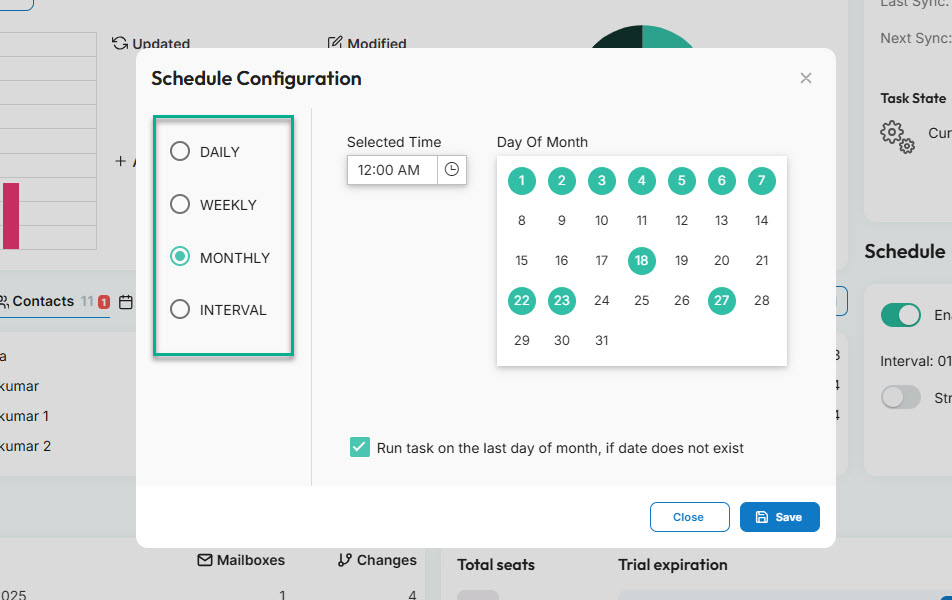
Choosing the perfect cycle for your organization will drastically reduce IT support tickets.
#2. You are not removing obsolete contacts from the GAL
Auto sync without cleanup creates noise. Lots of it.
Former employees, old vendors, outdated numbers. These still land on phones because they still live in the GAL. Employees scroll, tap the wrong contact, and suddenly a call fails or reaches the wrong person.
Then comes the ticket. From their side, it feels sloppy. From IT’s side, the sync is working perfectly.
The real issue is that the source of truth hasn’t been maintained. Auto sync amplifies whatever lives in the directory, good or bad.
#3. You sync contacts, but not the ones people actually need
This is where logic and real usage drift apart.
IT syncs the main directory. Employees are looking for shared mailboxes, room contacts, on-call numbers, partners, or department-specific lists. When those aren’t there, they assume the sync missed something.
So they ask IT to add a contact manually or “fix” the sync. In reality, the scope just doesn’t reflect how people actually work. If the synced set doesn’t match daily behavior, tickets become a workaround.
CiraSync allows IT admins to select the specific source they want to sync. It can be an individual or a specific folder/directory.
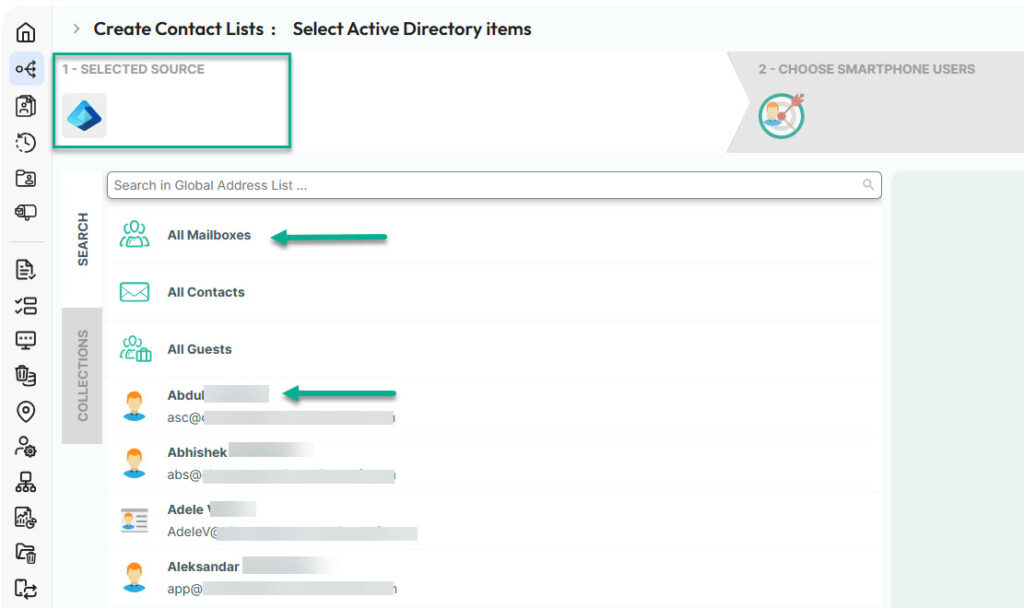
You can also create a contact collection — like «on-call numbers» — in CiraSync.

Then you can sync the collection to target employees so they have immediate access to the information.

#4. Mobile devices are treated as an afterthought
Everything looks fine in Outlook. Then someone opens their phone and sees duplicates, half-filled names, or numbers in the wrong fields. That’s when trust breaks.
Once users stop trusting what they see on their phone, they start reporting every small issue. Even expected behavior becomes suspicious.
Mobile devices are where contact sync is judged, not the admin console. If you don’t test and tune for iOS and Android regularly, auto sync feels fragile, even if the backend is solid.
#5. No one explained what “auto-synced” actually means
This might be the biggest one. Employees don’t know when contacts update. They don’t know whether saving a contact manually is okay. They don’t know if deleting a contact will break something. So they ask, repeatedly.
Silence creates more IT tickets than you might think. A short explanation, even a simple internal page that says what’s automatic and what’s not, can eliminate a surprising number of tickets.
People don’t need technical details; they need reassurance.
Eliminate contact-related tickets
Contact auto-sync solves the hard technical problem, but tickets usually come from expectation gaps, not broken systems.
Sync timing, directory hygiene, scope, mobile behavior, and basic communication all shape how employees experience the setup. When those are off, IT feels busy even though the tools are doing their job.
If contact-related tickets won’t die, it’s worth stepping back. The answer is often less about changing the tool and more about aligning it with how people actually work.