

CiraSync HubSpot Integration
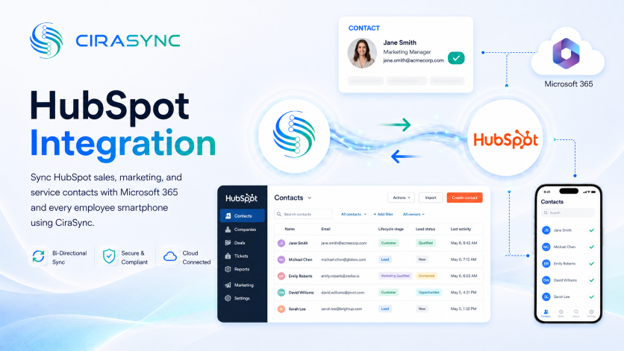
Keep every prospect and customer contact tied to the right lifecycle stage. When a contact updates in HubSpot, it reflects across Microsoft 365 and on employee devices, maintaining pipeline accuracy with CiraSync.
Two-Way: CiraSync Hub
One-Way: CiraSync Cloud, CiraSync On-Prem
What This Integration Does
- Two-way sync of HubSpot contacts with the Microsoft 365 GAL, user mailbox, Google, iCloud, or another CRM (via CiraSync Hub)
- Automatic push of updated contacts to iOS and Android devices (via CiraSync)
- Contact data stays current across all endpoints without manual exports or imports
How It Works
Step 1: Connect
Sign into HubSpot and Microsoft 365 (or another endpoint) via CiraHub. Admin consent for Microsoft 365 is required.
Step 2: Map
Choose which HubSpot fields, lifecycle stages, and contact lists sync, and define the rules for each.
Step 3: Sync to Phones
CiraSync pushes updated contacts to all enrolled employee devices automatically. No action required from end users.
Step 4: Stay Current
Any future contact updates in HubSpot flow through the same pipeline, keeping devices and directories aligned in real time.
Note
HubSpot connects to other platforms via CiraHub. CiraSync handles distribution to employee smartphones. Both products work together as part of the Cira platform.
Who Benefits
Sales Teams
Sales reps get HubSpot contacts, including prospect names, numbers, and lifecycle stages, delivered directly to their phones. Caller ID works from the moment a lead enters the CRM, so no deal slips through because of an unrecognized number. See how CRM-to-phone sync works.
Customer Success Teams
When a contact moves from prospect to customer in HubSpot, that update propagates to every device automatically. Customer success teams always reach clients at the right number, with the right context.
Marketing Teams
HubSpot Marketing Hub and Sales Hub both connect through CiraSync. Contacts created or updated by marketing campaigns are available across Microsoft 365 and employee devices without manual intervention.
Outcomes
- Instant caller ID for all HubSpot contacts on employee smartphones
- Fewer missed deals and faster response times across sales and service teams
- Elimination of manual contact exports and CSV imports
- Consistent contact data across CRM, directory, and mobile, tied to accurate HubSpot lifecycle stages
Requirements
- CiraHub subscription
- HubSpot subscription
- Microsoft 365 admin consent

