
Home > QuickStart Guide (Page 2)
QuickStart Guide

Preparing Your Microsoft Windows Server for CiraSync On Premise
This guide provides step-by-step instructions to prepare your Microsoft Windows Server for CiraSync On Premise, ensuring a smooth and efficient setup process. Note: If you are configuring CiraSync On Premise for a cloud-only environment (e.g., syncing directly to...
Installing CiraSync On Premise License Packs
During the CiraSync On Premise setup, trial licenses were requested. The following steps outline how to install CiraSync On Premise license packs. Instructions 1. Open the email sent by CiraSync On Premise during the UCM setup. This email contains the license pack as...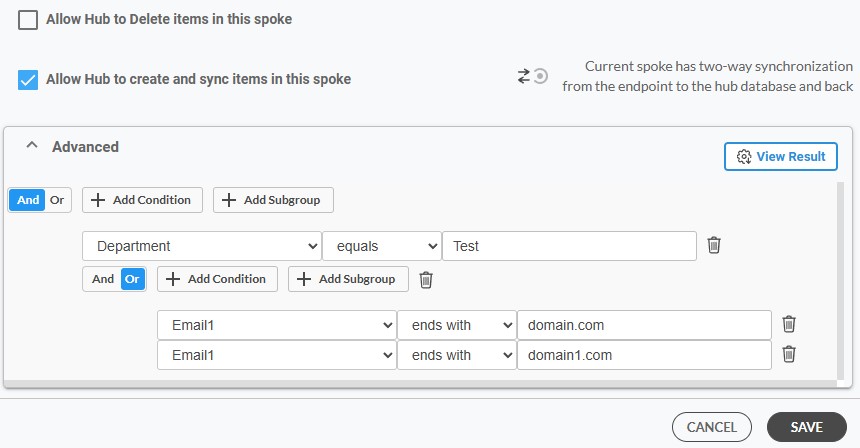
How to Setup Conditions and Subgroups
Condition and subgroup settings in CiraHub serve as more than just data filtering features; they help organization refine and optimize their data management strategy. By segmenting data into smaller, relevant subsets, you ensure that only necessary information is...
Configuring Auto-License Settings in CiraSync
Auto License Settings simplifies the process of managing licenses for your users. It ensures smoother synchronization of contacts and calendars across your organization, reducing manual administrative tasks and the potential for oversight. CiraSync automatically...
Setting Up Your Contact Field Settings in CiraSync
By carefully configuring contact field settings and understanding when to use each one, you can streamline your contact management process and prevent common problems such as outdated or conflicting information. To set up CiraSync Contact Field Settings, follow these...
Setting Up Points of Contact (POCs) in CiraSync
CiraSync allows organizations to designate specific users or groups as Points of Contact or (POCs). POCs serve as the go-to individuals for specific inquiries or issues, simplifying and speeding up the communication process. This ensures that information reaches the...
How to Add Administrators in CiraSync
The role of administrators in CiraSync is pivotal. Administrators have the ability to adjust settings and manage access, ensuring that synchronization processes are both efficient and secure. By adding administrators, organizations can delegate responsibilities...
Save Outlook Contacts on iOS and Android
This article will show users how to save and sync Outlook contacts directly to their phone’s native contact list on both iPhones and Android devices. By saving Outlook contacts directly to mobile devices, users will see their contacts populated within the...

