




Every financial institution has had a day when the directory lets someone down. A relationship manager dials a number that was reassigned last quarter. A deal team spends the first week of an integration asking who sits where. An analyst cannot find the new compliance contact on a phone. Each gap looks small, and each one costs time when the work cannot wait.
The cause is usually the same. Contact data lives in Microsoft 365, while the phones, shared mailboxes, and second tenants that need it get updated by hand, if they get updated at all. Banks and investment firms work under strict rules for how information is handled, yet many still rely on manual contact updates and fragmented systems. We built CiraSync to automate that work inside the Microsoft 365 environment these firms already trust.
TL;DR
- Manual contact updates create avoidable risk. Errors in directories and calendars slow teams down, and regulated environments leave little room for them.
- Distributed teams feel it first. Multiple offices, reorganizations, and steady hiring keep directories in constant motion.
- Automation takes IT out of the update loop. CiraSync syncs Global Address Lists, shared mailboxes, and calendars to mobile devices and Outlook on a schedule that IT sets.
- Multi-entity firms can unify tenants. A global investment firm managing more than $100 billion in assets keeps 2,000+ employees across two dozen offices current, and feeds a mailbox in a second Microsoft 365 tenant, with no custom engineering.
- Growth and M&A stay manageable. The same firm added 250 seats mid-term without disrupting sync, and multi-tenant configurations let IT push one unified directory from day one of an integration.
- Security review gets simpler. CiraSync is SOC 2 Type II certified, works with Microsoft Entra ID authentication, and does not store contact data in its own environment.
Where Financial Services Contact Workflows Break Down
Three pressures show up again and again in banking and investment environments:
- Manual updates create errors. Every hand-edited directory or phone list is a chance for a wrong number, a missing colleague, or an outdated title.
- Distributed teams drift apart during change. Deal teams, operations staff, and support functions sit in different offices, and reorganizations move people faster than lists get updated.
- IT carries the overhead. Keeping contacts and calendars current at scale lands on the same team that handles security reviews, migrations, and audit preparation.
The table below shows how six common workflows change when contact and calendar sync runs automatically. IT selects the approved contacts, calendars, and groups once, sets the sync frequency, and every employee sees current data across devices.
| Workflow | With Manual Updates | With CiraSync |
| New Hires and Role Changes | IT or office staff edit lists by hand, so phones lag behind the org chart. | Changes made in Microsoft 365 reach devices on the next scheduled sync, or right away with a manual sync. |
| Multi-Office Coordination | Each office keeps its own version of the directory, and the versions drift. | One source of truth reaches every device, in every office. |
| Shared Mailboxes and Calendars | Details go stale until someone remembers to refresh them. | Global Address Lists, shared mailboxes, and calendars sync to mobile devices and Outlook automatically. |
| Multiple Legal Entities | A second tenant needs its own process or a custom integration. | Multi-way sync extends the same deployment across tenants, with no custom engineering. |
| Mergers and Acquisitions | Integration teams reconcile directories by hand before anyone can reach a new colleague. | Multi-tenant configurations aggregate contacts from several Microsoft 365 sources into one directory from day one. |
| IT Workload | Recurring tickets and manual refreshes pile up as headcount grows. | Sync runs on a schedule IT sets, and license counts scale without added complexity. |
What Manual Contact Updates Cost IT Each Year
Ten manual update requests a week cost an IT team 130 to 260 hours a year. That figure uses the same illustrative math as our build vs. buy framework: each request takes 15 to 30 minutes, and the chart scales weekly volume from 5 to 20 requests. Test the model against your own ticket history, since a multi-office firm with steady hiring may sit anywhere on this range.
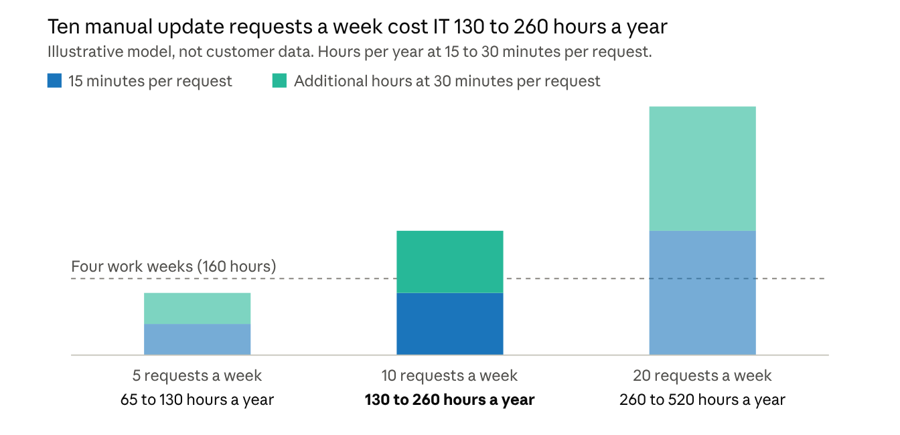
Illustrative model: weekly requests x 15 to 30 minutes x 52 weeks. Not customer data.
Even the lightest scenario on the chart exceeds a full 40-hour work week. Those hours come from the team that also handles security reviews, migrations, and audit preparation. Automated sync returns that time while IT keeps control of which contacts, calendars, and groups sync.
How a Global Investment Firm Unified Contact Sync Across Two Tenants
An alternative investment firm managing more than $100 billion in assets needed accurate corporate contact directories to keep its deal teams, operations staff, and support functions connected across two dozen global offices. More than 2,000 employees needed current contacts on every mobile device, and the firm did not want IT managing that process by hand.
The firm moved from an on-premises deployment to CiraSync in 2024 to lighten the maintenance load on its infrastructure team. As headcount grew, we added 250 seats mid-term to keep pace with new hires, without disrupting the sync already in place.
In 2025, a new requirement surfaced. Like many investment firms structured around multiple legal entities, the firm needed corporate contacts to flow into a mailbox in a separate Microsoft 365 tenant, and it did not want to build a custom integration to get there. Our support team demonstrated multi-way sync, which we built for cross-tenant contact synchronization, and rolled it into the firm’s existing deployment. Multi-way sync was live within weeks of the first demonstration, with no custom engineering on either side.
Today, CiraSync keeps corporate contacts current on the mobile devices of all 2,000+ employees, while multi-way sync keeps the second tenant’s mailbox aligned with the same source of truth. New employee information entered in Microsoft 365 propagates on the next scheduled sync, or immediately through a manual sync. IT no longer coordinates updates between tenants by hand.
Security Questions Financial Institutions Should Ask Any Sync Vendor
Vendor risk reviews in financial services ask hard questions, and a contact sync tool deserves the same scrutiny as any system that touches employee data. Three questions cover most of the ground:
- Where does contact data live? CiraSync does not store contact data in its own environment, so records stay inside the institution’s Microsoft 365 tenant and its configured data residency boundaries. That supports GDPR requirements for EU institutions.
- Who controls administrative access? CiraSync integrates with Microsoft Entra ID, so banks can enforce their existing authentication policies, including certificate-based authentication, multi-factor authentication, and conditional access, before any administrative access is granted.
- What independent assurance exists? CiraSync is SOC 2 Type II certified, which gives vendor risk and due diligence teams independently verified evidence that its security controls hold up over time. Our Security at CiraSync page has the details.
Institutions with strict hosting requirements can run CiraSync inside their own environment, and teams that need two-way or cross-tenant sync can add it to the same deployment. Our Financial Services page walks through how banks and investment firms put each option to work.
See How This Fits Your Institution
Running more than one tenant, planning an integration, or watching a directory drift out of date? Show us. We will map your environment to the workflows above and show you where automated sync saves your team the most time.
FAQ
How does automated contact sync reduce compliance risk for financial institutions?
Automated sync replaces hand-edited directories with a process IT configures once, so contact data stays accurate without relying on individual updates. IT selects the approved contacts, calendars, and groups, and Microsoft Entra ID policies control who can reach the administrative side. Fewer manual edits mean fewer wrong numbers, outdated titles, and gaps that surface during reviews.
Can financial firms with multiple legal entities sync contacts across separate Microsoft 365 tenants?
Yes, CiraSync multi-way sync keeps contacts aligned across tenant boundaries from the same deployment. A global investment firm used it to feed a mailbox in a second Microsoft 365 tenant from the same source of truth that serves its 2,000+ employees, with no custom engineering.
How quickly can a financial institution roll out contact sync to employee phones?
Most environments go live in days. In the investment firm case study, multi-way sync for a second tenant was live within weeks of the first demonstration. After setup, new employee information entered in Microsoft 365 reaches devices on the next scheduled sync, or immediately with a manual sync.
Does CiraSync store our firm’s contact data?
No, CiraSync does not store contact data in its own environment. Contact records stay within the institution’s Microsoft 365 tenant and its configured data residency boundaries, which supports GDPR compliance requirements for EU financial institutions.
How does contact sync help during mergers, acquisitions, and rapid growth?
It lets IT aggregate contacts from multiple Microsoft 365 sources and push one unified directory to employee phones from day one of an integration. Growth works the same way: the investment firm in our case study added 250 seats mid-term without disrupting the sync already running.

