

Sync Clio Contacts to Microsoft 365 & Attorney Smartphones Automatically
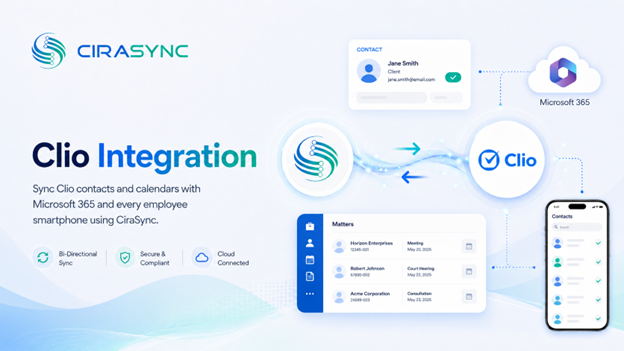
Keep every contact tied to the right matter. When a client’s information updates in Clio, it reflects across Microsoft 365 and on attorney devices automatically, maintaining matter-centric accuracy without manual exports or spreadsheet cleanup.
Two-Way: CiraSync Hub
One-Way: CiraSync Cloud, CiraSync On-Prem
What This Integration Does
- Two-way sync of Clio contacts (and/or calendars) with the Microsoft 365 Global Address List (GAL), User Mailbox, Google, iCloud, or another CRM via CiraSync Hub
- Automatic distribution of updated contacts and calendars to Outlook and iOS/Android smartphones via CiraSync
- Filter and segment which contacts sync to which attorneys
How It Works
- Connect Sign into Clio and Microsoft 365 inside CiraSync Hub to enable two-way sync for client and matter contacts.
- 2. Map Choose fields and sync direction (Clio to GAL or another endpoint), and apply any filtering or segmentation needed.
- 3. Sync to Phones CiraSync automatically pushes the latest Clio contacts into users’ native Contacts apps. No mobile app required.
Note: Clio connects through CiraSync Hub for bidirectional sync. CiraSync handles secure, automated delivery to smartphones.
Who Benefits
Legal Teams & Attorneys: Always-current client and matter contacts on every device, so attorneys stay accurate and responsive whether they’re in the office or in court.
Support & Intake Teams: Faster, more accurate client communication with contact data that’s never stale.
IT Departments: Centralized sync control, full auditability, and zero end-user management overhead.
Outcomes
- Reduce errors and mismatched contact data between Clio and Microsoft 365
- Save hours every week by eliminating manual exports, imports, and spreadsheet updates
- Improve responsiveness with accurate caller ID and up-to-date contact details on every device
Requirements
- CiraSync Hub subscription
- Clio subscription
- Microsoft 365 admin consent
Trusted by Legal Professionals Everywhere
“It works perfectly. Easy to set up. Very helpful to get us all set up. We have had to call twice for tweaks, and they answered on the spot. Issue fixed immediately.” Mitchell, Law Practice
“The go-to solution for syncing important info within my organization.” James, Legal Service Professional

