If you’ve ever tried managing contacts or shared calendars across dozens or even thousands of employee phones, you already know how messy it gets. Outlook stays clean. Smartphones never do. That’s the gap CiraSync fills.
This CiraSync FAQ pulls together the most common questions teams ask when they want to understand not only how CiraSync works, but how it stays secure and compliant as it does.
General Questions
What is CiraSync
CiraSync is a cloud platform that automatically syncs Microsoft 365 contacts and calendars to employee smartphones. It’s designed for organizations that rely on accurate, up-to-date information in Outlook but struggle to keep that same data available on iPhones and Android devices without manual syncing.
What data sources can CiraSync sync from?
CiraSync syncs from many Microsoft 365 sources, including the Global Address List, public folder contacts, shared mailboxes, distribution lists, Salesforce, and company-wide address books.
It can also pull data from SaaS tools when paired with CiraHub, which allows organizations to sync external platforms into Microsoft 365 before pushing the information to smartphones.
Does CiraSync require an app on employee phones
No, employees do not need to install anything. CiraSync writes directly to the native Contacts and Calendar apps on each device, which means everything looks and feels like part of the phone itself.
This also reduces training needs, because employees use the apps they already know.
How does CiraSync sync contacts to smartphones?
CiraSync connects to your Microsoft 365 tenant, pulls contacts from sources such as the GAL, shared mailboxes, distribution lists, or public folders, and then pushes those contacts to the Contact app on the users’ phones.
The sync happens automatically, so employees always see the latest information on their phones without installing anything or updating anything manually.
Does CiraSync work with Microsoft 365 and Outlook?
Yes, CiraSync is explicitly built for Microsoft 365 and works seamlessly with Outlook. It uses Microsoft Graph permissions to read the contacts and calendars you choose, then keeps that data aligned across Outlook, Microsoft 365, and the smartphones linked to your organization.
How often does CiraSync update contacts and calendars?
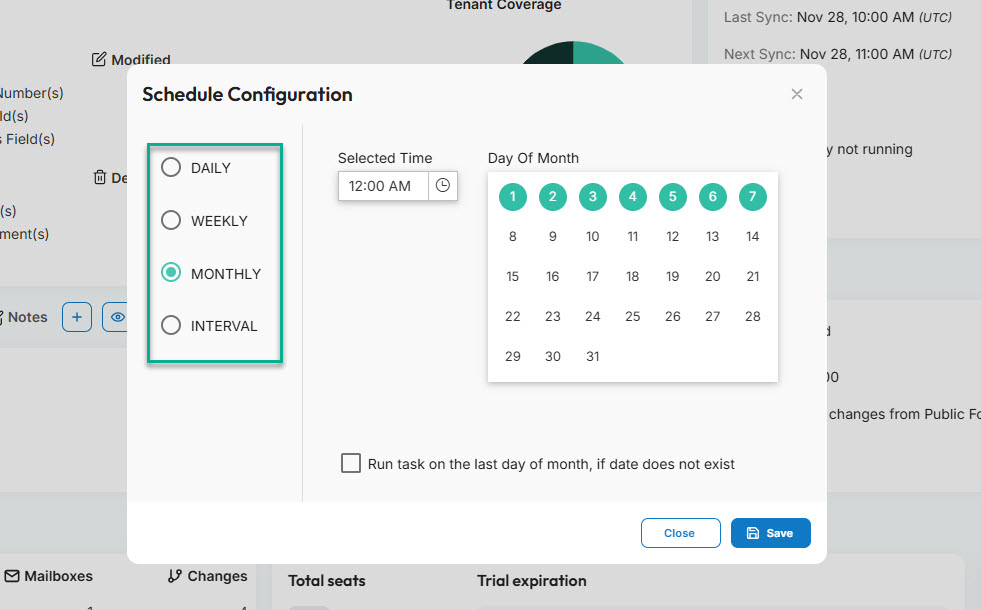
CiraSync runs frequent automated sync cycles throughout the day. It syncs contacts and calendars:
- Daily — Once per day (e.g., 09:00 AM)
- Weekly — Select the days (e.g., Monday, Wednesday, and Friday at 09:00 AM)
- Monthly — Select the days of the month (e.g., 6th, 10th, and 18th at 10:00 AM)
- Interval — Choose a time interval (e.g., every one hour)
When an admin makes a change in Microsoft 365, the system detects it and updates every assigned user’s smartphone on the next cycle. This keeps contact information fresh without requiring any manual steps from IT or employees.
Can CiraSync sync shared calendars?
Yes, CiraSync can sync shared calendars directly to the native calendar apps on iOS and Android. Admins simply select the calendar source in the CiraSync dashboard, assign users, and let the system handle all updates.
Events appear automatically on employees’ phones, which is especially helpful for field teams that depend on real-time scheduling.
Security and Compliance Questions
Is CiraSync secure for enterprise use?
CiraSync is built to meet enterprise security expectations. It relies on Microsoft Graph API permissions, does not store credentials, and never saves contact or calendar data on its servers.
All processing runs inside the customer’s Microsoft 365 environment, and the platform includes role-based access controls to ensure only authorized admins manage sync tasks.
What permissions does CiraSync need in Microsoft 365
CiraSync requires technical permissions such as Read directory data, Sign in and read user profile, Read all users’ full profiles, Read and write contacts in all mailboxes, Read and write calendars in all mailboxes, Read all user mailbox settings, and the ability to use Exchange Web Services with full mailbox access when needed.
These are the exact permission names listed in the CiraSync application consent guide.
How does CiraSync protect contact and calendar data during processing
CiraSync processes all data inside Microsoft Azure and uses Exchange Web Services over HTTPS, which never passes through the public internet.
Sync workers compare data inside Azure Active Directory and Microsoft Exchange, update mailboxes securely, and store temporary cache data in a protected Azure database that can be purged after every sync for added security.
For more questions regarding compliance and security, check out this document.
Does CiraSync store any user data on its servers
CiraSync does not store passwords, and it only keeps a temporary encrypted cache of sync configuration data and information pulled from Azure Active Directory.
This cache auto-deletes after 60 days, and users can choose to purge it after every sync task if they prefer stricter data handling.
Is CiraSync compliant with common standards like GDPR
Yes. CiraSync complies with GDPR requirements, including the right to be forgotten, data portability, data storage compliance within the EU, and informed consent.
All personal data in the EU is processed inside European Microsoft Data Centers, and all personal identifying information is encrypted.
How does CiraSync handle access control for administrators
Billing Questions
What is the difference between the Personal Edition and the Enterprise Edition
Enterprise Edition is designed for organizations and supports automated, centralized syncs for hundreds or thousands of users. It includes advanced controls, reporting, and full admin management.
Personal Edition, on the other hand, is a free self-serve tool intended for individual users who want to sync their own contacts without the broader capabilities required by businesses.
How is CiraSync licensed and billed
CiraSync Enterprise Edition uses a per-user subscription model billed annually. Pricing depends on the number of licensed users, and organizations can scale up or down as their teams change.
What kind of support does CiraSync offer to customers
CiraSync provides email support, knowledge base articles, setup guides, onboarding help, and ticket-based assistance for Enterprise Edition users. Most issues get resolved quickly because the platform has a simple configuration model and clear error reporting.
Try CiraSync Today!
If you’ve made it this far, you probably see why so many IT teams rely on CiraSync. It removes the constant friction of keeping contacts and calendars updated, and it does that while staying inside the guardrails of Microsoft 365 and Azure.
The security model is simple to understand: nothing is stored, and GDPR controls are already built in.
If you want to see what this looks like in your own environment, you can try CiraSync now and watch a full sync run without touching a single phone.
And if you still have questions or want help sorting out a specific scenario, you can book a short demo, and we’ll walk you through it.